Canvas for Parents: The Complete Guide (2026)
Everything parents need to know about Canvas: getting parent access, checking grades, finding missing work, setting up alerts, watching grade trends, and what to do when grades slip.
Read the guide →Grades, missing work, and what’s due next across every class — for students staying ahead and parents staying in the loop.
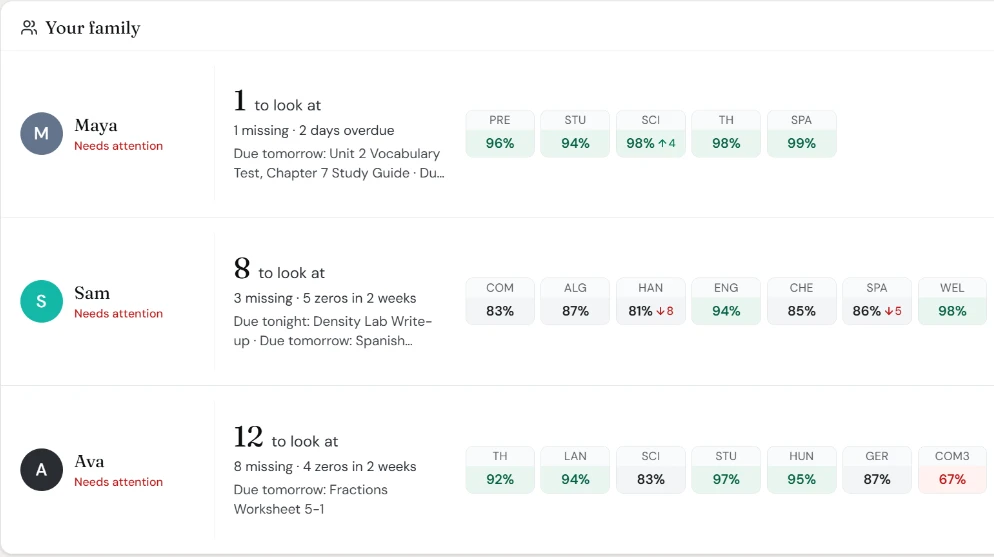
Every kid and every class on one screen, with an afternoon check-in and evening roundup by push or email.
Your grades and deadlines in one place, and a daily plan on your phone: what’s due tonight and how long it’ll take.
Missing work dashboards, cross-course insights, and intervention signals — all in one place.
Canvas wasn’t built for parents. GradeGlance is.
“Logging into Canvas every day to check each kid’s grades is exhausting”
GradeGlance pulls everything into one dashboard — all kids, all courses, updated automatically
“You only find out about missing assignments after the grade drops”
Get alerts the moment something is overdue, before it affects their GPA
“You can’t tell if they’re actually keeping up or falling behind”
See grade trends over time and risk scores that surface problems early
GradeGlance pulls everything from Canvas LMS into one place, so you can focus on the work—not on chasing down information.
See all your children’s progress in one place.
Tonight’s work every afternoon and anything late each evening, by push or email.
Track grade changes over time with visual charts.
Get AI-powered analysis of academic performance.
GradeGlance watches Canvas all day and sends a short note at the times you pick, with names, due times and what’s still open.
An afternoon check-in. Tonight’s work for every kid, tomorrow’s quizzes and tests, and the busy days coming up.
An evening roundup. What’s late, and what’s due by midnight that still isn’t turned in.
Your times, your channel. Pick when each one arrives, by push or email. Quiet hours hold everything else until morning.
One tap to the details. A check-in about one kid opens their Tonight list: what’s late, what’s due, and when to start.
Reminders if you want them. Optional nudges when it’s time to start something, and a last call before it’s due.
A daily plan. What’s due tonight and about how long it’ll take, at the time you choose.
Late alerts while it still counts. A heads-up the moment something goes late, and whether Canvas still takes it.
“Time to start” and last call. Start-by reminders sized to the work, and a nudge before the deadline (Student Plus).
No false alarms. We only say something isn’t turned in when we’ve checked Canvas in the last 45 minutes. If the data is stale, we say nothing.
Start free and upgrade when you need more students, notifications, faster syncs, or AI-powered insights.
Every new parent account starts with a free 30-day Max trial.
No credit card required. When the trial ends, you keep the free Basic plan unless you choose to upgrade.
Free forever
Most Popular
Everything, unlimited
Your privacy and security come first — always.
We only read data from Canvas — never modify grades or assignments.
Your Canvas credentials are encrypted with bank-grade security.
Your family's data is never sold or shared with advertisers.
Revoke access anytime from your Canvas settings.
Not affiliated with Instructure, Inc. Canvas is a trademark of Instructure, Inc.
Plain-English guides to grades, missing work, and parent access.
Everything parents need to know about Canvas: getting parent access, checking grades, finding missing work, setting up alerts, watching grade trends, and what to do when grades slip.
Read the guide →A calm plan for parents when a child is failing a class: find out exactly why in Canvas, see how much is recoverable, talk without a fight, email the teacher, and make a two-week catch-up plan.
Read the guide →Click View Grades on your Canvas Dashboard to see every course, or Grades inside a course for the details. Plus the Canvas Student app, What-If scores, past courses, and why a grade might not show.
Read the guide →Everything you need to know about GradeGlance.
Connect your Canvas account in under two minutes. See every grade, missing assignment, and due date in one place — free for students, and parents start with a free 30-day Max trial.
Get Started FreeNo credit card required. Free plan available.