Know how every kid is really doing in school.
GradeGlance watches your kids’ Canvas accounts for you: every grade, every missing assignment, every zero, on one screen. Then it tells you once a day what needs a conversation, so you’re not the last to know when a grade starts slipping.
Free 30-day Max trial. No credit card.
Three kids, three very different weeks
Plenty of families have one of each. Here’s what each looks like when you can see it all at once.
The one doing great
Grades in the 90s, nothing missing. You see it in a glance and leave them alone, which is what they want anyway.
The one in the middle
A zero shows up in one class. You get an alert that day, and it gets fixed while the late window is still open.
The one struggling to keep up
Six things late, two due tonight, a class sliding. You see the whole pile in one place, so the conversation is a plan, not an argument.
Monitor grades without hovering
Every kid, every class, one screen
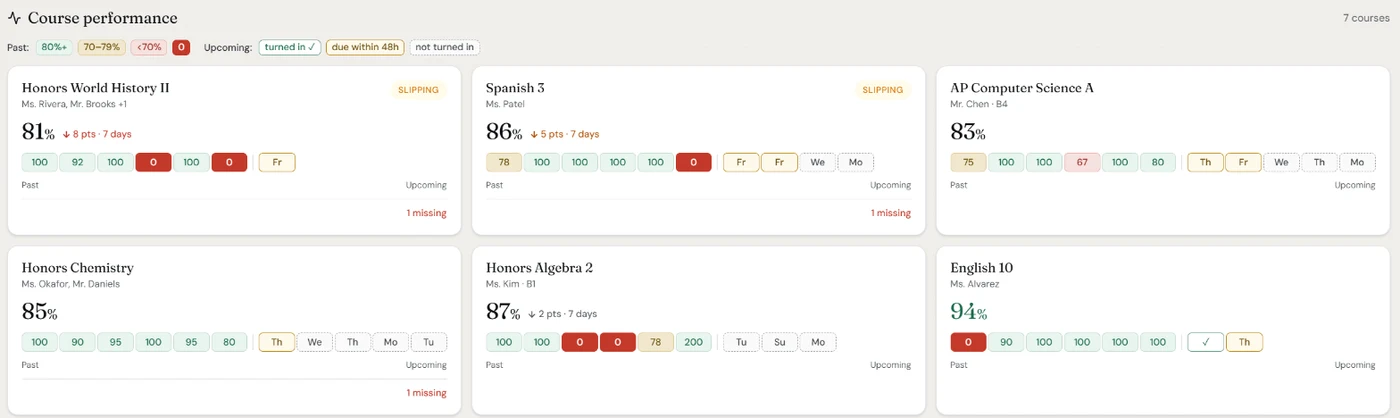
Each child’s class grades and a count of what to look at: missing work and zeros from the last two weeks. No more logging in and switching students.
Catch a slipping grade early
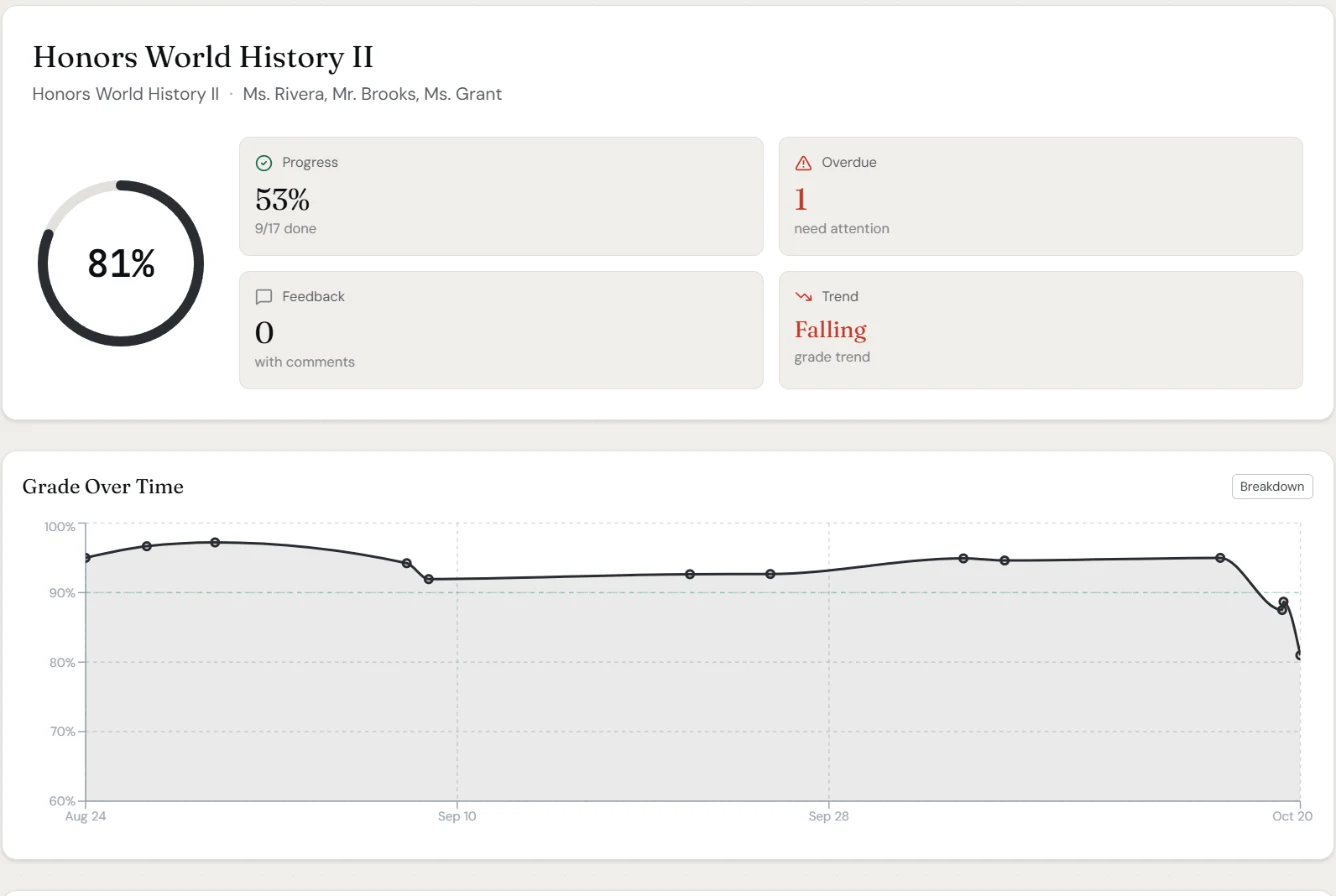
Class grades show an arrow when they move 3 or more points in about two weeks, and classes below 70% are flagged. Every course has a grade-over-time chart.
One check-in a day, not a stream of alerts
An afternoon check-in with tonight’s work, tomorrow’s quizzes and busy days ahead, and an evening roundup of anything late or not turned in. Push or email, at times you pick.
Alerts when it matters
Push alerts for new grades, zeros and missing work, with quiet hours overnight. Optional reminders when it’s time to start something.
The daily check-in, roundup and alerts are on Standard and Max. See plans
Set up in about ten minutes
1. Get Canvas parent access
If you don’t have it yet, pair a Canvas parent (observer) account with each child. Here’s how to become an observer on Canvas.
2. Connect it to GradeGlance
Create an account and link your Canvas parent account with a read-only token. Every paired kid shows up together.
3. Pick when you hear from us
Choose the time of your afternoon check-in and evening roundup, and whether they come by push or email.
Free 30-day Max trial. No credit card.
Questions parents ask
- Will my child know I’m checking?
- Usually, yes, and that’s a good thing. Canvas parent access normally starts with a pairing code from your child’s own Canvas account, so they know you can see their classes. GradeGlance shows what your Canvas parent account can already see, just organized. Many families agree up front on how they’ll use it.
- What do I need to get started?
- A Canvas parent (observer) account paired with your kids, which your school’s Canvas supports. Then you connect it to GradeGlance with a read-only access token from your Canvas settings; the app walks you through it. Our guide to becoming an observer on Canvas covers the first part.
- Is this the same as the Canvas Parent app?
- No. The Canvas Parent app shows each class’s grade and can alert you about missing work. GradeGlance puts every kid and every class on one screen, flags zeros and slipping grades, shows how each grade changed over time, and sends one afternoon check-in and evening roundup instead of a stream of alerts. Plenty of parents use both.
- My kids go to different schools. Does that work?
- Yes, as long as their schools use the same Canvas site, which is usually your district’s. If your kids are in different districts with separate Canvas sites, GradeGlance connects to one of them at a time today.
- What does it cost?
- The Basic plan is free for one child, without notifications. Standard is $3.99 a month for up to three kids and adds the daily check-in and roundup and alerts. Max is $7.99 a month for any number of kids, with 5-minute syncs and AI chat. Every new parent account starts with a free 30-day Max trial, no credit card required.
- Can GradeGlance change anything in Canvas?
- No. Access is read-only. GradeGlance can’t submit, edit or delete anything, and your Canvas token is encrypted before it’s stored.
Free 30-day Max trial. No credit card.