How to Catch a Falling Grade Before It's Too Late
The early signs a Canvas grade is slipping (a single zero, missing work piling up, a 3-point slide in two weeks), why week two beats week eight, and what to do when you spot one.
Grades rarely crash. They slide. A zero here, a quiz that went badly there, two assignments that never got turned in during a busy week, and by the time the progress report arrives the B+ is a C and everyone is surprised. The frustrating part is that the slide was visible in Canvas the whole time. It just wasn't loud.
This guide covers the early signs worth watching, why catching them in week two beats catching them in week eight, and what to actually do when you spot one.
Why grades fall quietly
A Canvas course grade is an average, and averages hide movement. Early in a term each assignment carries a lot of weight, so the grade jumps around and it's hard to tell a bad week from a real problem. Later in the term the grade barely moves for any single assignment, which feels reassuring but means a slow slide can run for weeks before the total shows it.
On top of that, Canvas shows you the grade now. It doesn't tell you that the same class was 6 points higher two weeks ago. You have to remember, or you have to look at the grade history some other way.
The early-warning signs
1. A zero, even just one
A zero pulls an average down far harder than a low score. In a class with ten assignments averaging 88%, one zero drops the grade to 80%. Not every zero is final: teachers often enter a 0 as a placeholder for work they haven't graded yet, and some classes enter zeros automatically for anything marked Missing. Either way, a zero is the single most worth-asking-about thing in Canvas.
2. Missing work piling up in one class
One Missing label is often a paper hand-in Canvas didn't see. Two or three in the same class, within a couple of weeks, is a pattern: the student is behind, confused about how that teacher collects work, or avoiding something.
3. A slow slide over two weeks
Compare each class to where it was two weeks ago. A move of 3 points or more is worth a look. More than 5 points is a real drop, and it usually traces back to one or two specific assignments you can name.
4. A class dipping below 70%
Below 70% is where a class stops being “could be better” and starts limiting options: eligibility, prerequisites, a final exam that now has to go well. It's also where recovering takes the most work, so it's worth acting on the first week it happens.
5. A class that's gone quiet
No new grades in a class for two or three weeks isn't the same as “fine.” It can mean the teacher is behind on grading, and a batch of scores is about to land all at once. Ask what's been turned in, so the batch isn't a surprise.
Why week two beats week eight
Catching a problem early is cheaper in every way. Take that class with ten assignments at 88% and one fresh zero (80%). If the work gets made up for a 70% late score, the grade comes back to about 86%. Done in the same week, that's a short conversation and an evening of work. Found at the end of the term, the late window is often closed, the zero is locked in, and two more have joined it.
The same goes for a slide. A class that has lost 4 points in two weeks can usually be steadied with one conversation about what changed. A class that has lost 12 points over two months has habits behind it.
What to do when you spot one
- Ask about the specific assignment. “Canvas shows a zero on the Unit 3 quiz” gets a real answer. “Why is your grade dropping?” gets a shrug.
- Check whether late work is still accepted. Many Canvas assignments stay open after the due date with a penalty. A late 70% beats a zero every time.
- Look for the pattern, not just the item. Is it one class, one kind of assignment (quizzes, labs, reading logs), or one week when something else was going on?
- Email the teacher with something specific. “We noticed the grade went from 88 to 80 after the Unit 3 quiz; is there a retake or a way to make it up?” Teachers answer specific questions quickly.
- Check again in a week. The goal is a grade that stops sliding, not a perfect one.
A five-minute weekly habit
Once a week, for each kid: look at every class grade next to where it was two weeks ago, scan for zeros from the last two weeks, and count Missing labels per class. That's it. Five minutes on a Sunday catches nearly everything on this list while it's still easy to fix.
How GradeGlance makes this automatic
We built GradeGlance because doing that weekly pass by hand, for more than one kid, is a lot of clicking. It syncs your Canvas data on a schedule and does the comparing for you:
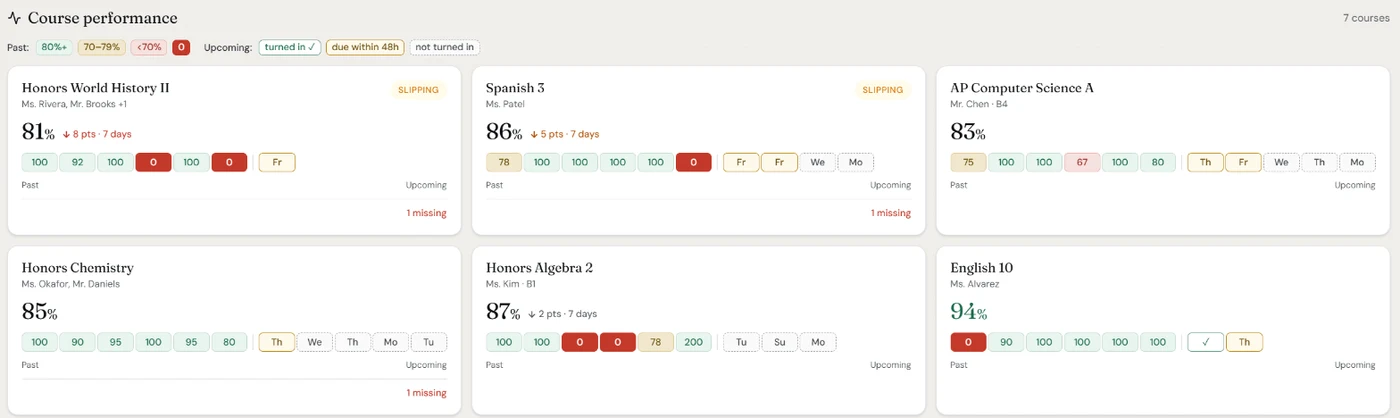
- Zeros from the last two weeks and all missing work are counted as “to look at” for each kid, with the list one tap away.
- Every class grade shows an arrow when it has moved 3 or more points over about two weeks, and the kid is flagged when a class falls more than 5 points. Classes below 70% are flagged too.
- Each course has a grade-over-time chart for the current grading period, so you can see exactly which assignment bent the line.
- On Standard and Max, you get push alerts for new grades and zeros, and an evening roundup of anything late or still not turned in, by push or email.
If your kids are spread across more than one school, see how to keep track of kids at different schools.