Kids at Different Schools? How to Keep Track of All of Them in Canvas
One Canvas parent account for every kid, what changes from elementary to high school, and a daily and weekly routine that scales to three kids at three schools.
One kid in elementary school, one in middle school, one in high school. Three buildings, a dozen-plus teachers, and three completely different ideas of how Canvas should be used. Keeping track of one student is a habit. Keeping track of three at different schools can feel like a part-time job.
The good news: in most districts it's one Canvas, one parent login, and one routine. Here's how to set that up, what changes from school to school, and a system that takes minutes a day instead of an evening a week.
Start with one parent account for every kid
Most districts run all their schools on a single Canvas site (often something like yourdistrict.instructure.com). If that's your district, you don't need a separate login per school. One Canvas parent (observer) account can be paired with every one of your kids: get a pairing code from each student's Canvas settings and add them one at a time. Our observer account setup guide walks through it.
Not sure whether your kids' schools share a Canvas? Compare the web address each school sends you to. Same address, same Canvas. If they're in different districts with different addresses, you'll have a separate parent login for each.
What changes from school to school
Even on one Canvas site, every school, and honestly every teacher, uses it differently. Knowing the differences keeps you from overreacting (or underreacting).
- How grades are shown. Elementary schools often use standards-based marks instead of percentages. High schools tend to weight assignment groups, so a test counts for far more than homework.
- How fast teachers grade. Some post scores the same day; others grade in batches every couple of weeks. A quiet gradebook means different things in different classes.
- How work is collected. Classes that collect paper can show work as Missing in Canvas until a grade is entered. Learn which classes do this and you'll stop chasing false alarms.
- Missing-work policies. Some classes automatically enter a zero for anything missing, so the grade drops the moment the due date passes. Others leave it blank until the teacher grades it.
- How much independence fits. A fourth grader may need you to look every day. A junior may need you to look once a week and ask good questions.
A routine that scales to three kids
The trick is asking the same few questions in the same order, for every kid, no matter which school they're at.
Daily, two minutes
- What's due tonight, for each kid?
- Is anything late or missing that wasn't yesterday?
Weekly, ten minutes
- Any zeros in the last two weeks?
- Has any class moved 3 or more points since last week?
- Which days next week are crowded, and for whom?
Doing that in Canvas means switching between students and opening each course, which is where the minutes add up. Whatever tool you use, the goal is the same: one place to look, with every kid on it.
When it all fits on one screen
That's the reason we built GradeGlance. Connect your Canvas parent account once and every paired kid shows up together, whichever school they attend:
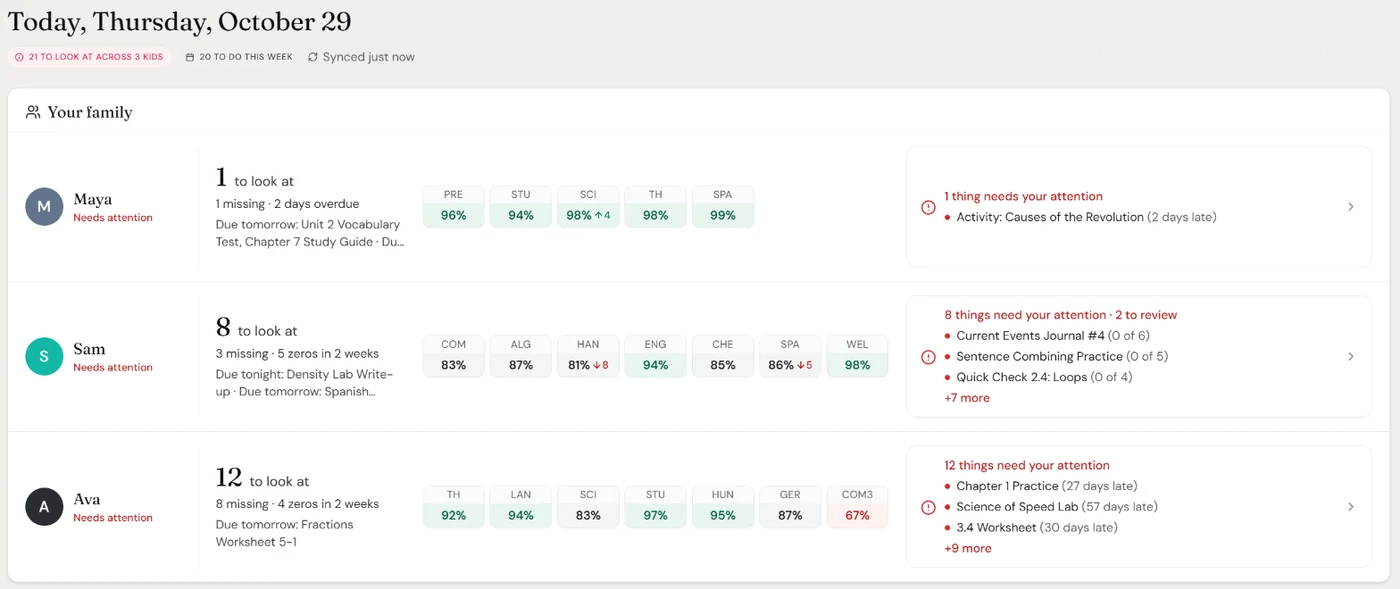
- One Today page for the family. Each kid gets a count of what to look at (missing work and recent zeros) and their class grades, with arrows on anything that moved 3 or more points in about two weeks.
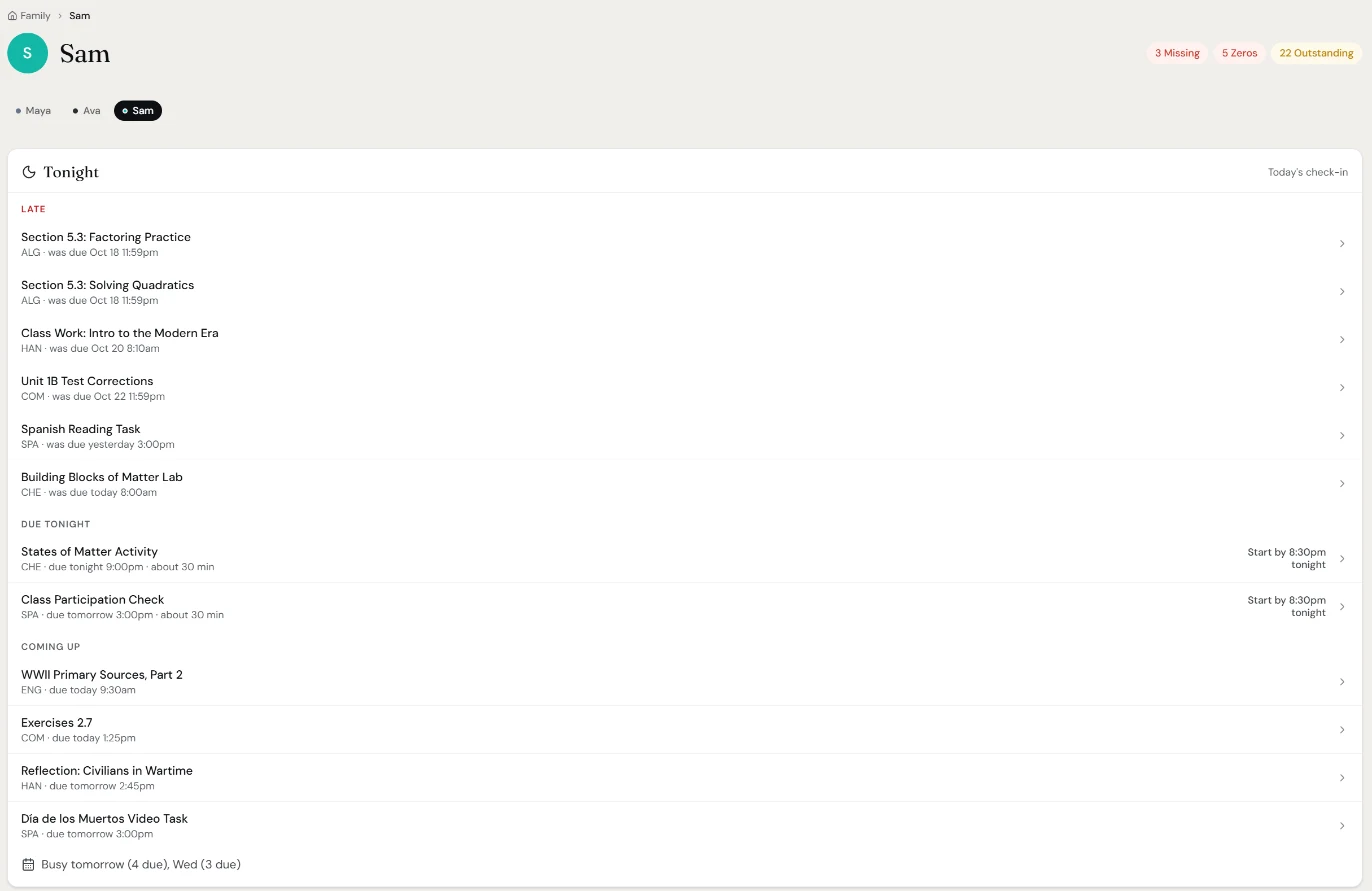
- A page for each kid. Their courses, what needs attention, their week ahead, and a Tonight list: what's late, what's due tonight with a time to start, and what's coming. Set each kid's own school, and on Standard and Max you'll see that school's lunch menu too, where we support the school's menu provider.
- One message for everyone. On Standard and Max, the afternoon check-in covers every kid in a single notification, including the busy days coming up, and the evening roundup does the same for anything late. Push or email, at times you pick.
Plans cover one kid on Basic (free), three on Standard, and as many as you have on Max. One thing to know if your kids are in different districts: GradeGlance connects to one Canvas site at a time today.
Once everyone is in one place, the next skill is spotting trouble early. Read how to catch a falling grade before it's too late.